TeachMe-Buzz
All About Computer Tips and Tricks, Software Reviews, Tips on Blogging, Cool Gadgets, XP Tweaks and Many More....
Showing posts with label Computer. Show all posts


Google bring new and improved search options to users. Here are the list of feature in the new Google search options:
  1. Video
  2. Forums
  3. Reviews
  4. Wonder Wheel (mind map presentation)
  5. Timeline (buzz about the topic over time)
  6. Google Squared
  7. Rich Snippets


AutoRun changes in Windows 7
Posted In: . By suwari

http://samsclass.info/335/windows-7-logo.jpg

The Microsoft Security Response Center (MSRC) has announced that Windows 7 AutoRun will have changes.

Many malware and viruses is taking advantage of the AutoRun functionality as a spread mechanism. AutoRun purpose is to provide a software response to hardware that inserted by the user.

The Windows 7 engineering team made 2 important changes:
  1. AutoPlay will only support CD/DVDs but not for USB drives.
  2. Clarify that the program being executed is running from external media.

Infected USB AutoPlayInfected USB AutoPlay after AutoPlay changes
Before the change (left) After the change (right)

Note: In the following example for a USB flash drive that has photos, malware registers as the benign task of “Open folders to view files.” If you select the first “Open folders to view files” (red box), you would be running malware. However, if you select the second task (green box), you would be safe running the Windows task.


Yahoo! GeoCities
Yahoo! GeoCities will close close later this year.

Yes, Yahoo! have decided that to close GeoCities. This is true. You can view this in Yahoo! GeoCities

For more information or help about this, please click here.


What that advertisement mean to people who buy PC? Is it affordable even for homeless people? Well, it show that even homeless can use PC now.

What will Microsoft fight back with? Some rich girl throw money and give every of her friend a Mac AirBook?

GMail Turn 5, Happy Birthday

Posted In: . By suwari

Gmail 5th birthday cake

If you noticed, GMail have put a cake in their homepage. GMail age is 5 years now.
GMail was launched five years ago and it have changed it bring more feature every year. Hopefully, GMail will keep providing us a better service.

Source: TAC


Foxmarks is becoming Xmarks

Posted In: . By suwari

I just got an email this morning regarding that one of the popular Firefox add-in, Foxmarks.

What is Foxmarks or Xmarks?
Xmarks is a free add-on for your browser (Firefox, IE and Safari)that synchronizes and backs up your bookmarks across multiple computers. Xmarks helps you find the best sites on the web based on what millions of people are bookmarking.

Foxmarks not only change their name but also enhancing their browser add-on and web site capabilities.

For those who currently using Foxmarks, upgrade to Xmarks now.

Xmarks new discovery features:

1. Smarter Search

2. Site Info

3. Xmarks.com


Source: TAC


How to remove frmwrk32.exe

Posted In: . By suwari

Symptoms:
  • Can not change background wallpaper from display properties
  • Task manager disable
How to remove:
  1. Download this applicationn. Click here.
  2. End this image name:
  • frmwrk32.exe
  • ntdll64.exe
  • Fvupir.dll
   3. Delete this file:
  • "c:\windows\system32\frmwrk32.exe"
  • "c:\WINDOWS\Fvupir.dll"
  • "C:\WINDOWS\agifiqem.dll"
  • "c:\docume~1\user\locals~1\temp\ntdll64.dll"
  • "c:\docume~1\user\locals~1\temp\mousehook.dll"
  • "c:\windows\system32\ntdll64.exe"
   4. Download here to enable change wallpaper in your desktop properties.

       or
     
       1. Start > Run > gpedit.msc
       2. Under User configuration > Click [Administrative Templates\Control Panel\Display\]
       3. There will be a value named "Prevent changing wallpaper" > Set it to "Not
           Configured"

       or

      
1. Run "Regedit".

       2. Navigate to: HKEY_LOCAL_MACHINE\SOFTWARE\Microsoft\ Windows\CurrentVersion  
           \policies

       3. If you see a folder (key) "ActiveDesktop" select it. If not, make a new key and label it 
           "ActiveDesktop".

       4. If you see "NoChangingWallPaper", double-click the DWORD value and set it to "0".
           Otherwise, you need to create a new DWORD value of "NoChangingWallPaper"   
           and set it to "0".

       5. Try changing your wallpaper. If this fix doesn't solve the problem, you may also need
           to make the above registry changes at location: HKEY_CURRENT_USER\Software
           \Microsoft\ Windows\CurrentVersion\Policies .


What is frmwrk32.exe

Posted In: . By suwari

This is cloaked malware and malware downloader.

Also use the following names:
  • 64439744.EXE
  • 71698828.DAT
  • VRTA.TMP
  • TOP[n].TXT
  • 6.TMP
  • 8.TMP
  • 93511318.DAT
  • 92837428.BAD
  • 11244301.EXE
  • LOADER[n].EXE
  • WJQS.EXE
  • A.EXE
  • SVCHOST.EXE
  • FRMWRK32/A.EXE
  • FRMWRK32/A0051148.EXE
  • FRMWRK32/U-STORE[n].GIF
  • FRMWRK32/FRMWRK32.EXE
  • RDL4.TMP
  • 45049727.EXE
  • 22690229.EXE
  • 303350.EXE
  • 06696265.EXE
  • 78935166.EXE
  • LOADER.EXE
File activity:
  • Deletes c:\windows\system32\frmwrk32.exe
  • Copies filec:\windows\system32\frmwrk32.exe to c:\windows\system32\frmwrk32.exe
  • Creates c:\windows\system32\ntdll64.exe
  • Creates c:\windows\system32\win32hlp.cnf
  • Creates c:\windows\system32\warning.gif
  • Creates c:\windows\system32\ahtn.htm
  • Creates c:\docume~1\user\locals~1\temp\cscript.exe
  • Creates c:\windows\cscript.exe
  • Deletes c:\docume~1\user\locals~1\temp\ntdll64.dll
  • Creates c:\docume~1\user\locals~1\temp\ntdll64.dll
  • Deletes c:\docume~1\user\locals~1\temp\mousehook.dll
  • Creates c:\docume~1\user\locals~1\temp\mousehook.dll
  • Moves c:\windows\system32\userinit.exe to c:\windows\system32\init32.exe
  • Copies filec:\windows\system32\ntdll64.exe to c:\windows\system32\userinit.exe
  • Copies filec:\windows\system32\ntdll64.exe to c:\windows\system32\dllcache\userinit.exe
  • Deletes c:\windows\system32\ntdll64.ex
Registry Activity:
  • HKEY_CURRENT_USER\Software\Microsoft\Windows\CurrentVersion\Policies\System DisableTaskMgr value:
  • HKEY_CURRENT_USER\Software\Microsoft\Windows\CurrentVersion\Policies\Explorer NoSetActiveDesktop value:
  • HKEY_CURRENT_USER\Software\Microsoft\Windows\CurrentVersion\Policies\ActiveDesktop NoChangingWallpaper value:
  • HKEY_CURRENT_USER\Software\Microsoft\Windows\CurrentVersion\Policies\Explorer NoActiveDesktopChanges value:
  • HKEY_CURRENT_USER\Software 2a422c91-6984-47e4-94be-04c4fad5f8d8 value:
  • HKEY_CURRENT_USER\Software 1099ce4a-ff51-4a8d-ab3c-c74b9c06e46f [REG_DWORD, value: 0000009F]
  • HKEY_CURRENT_USER\Software\Microsoft WinId {564F3BEB-5C60-48E6-A249-2EF6CE6B0C31}


How to remove ntdll64.dll

Posted In: . By suwari


Possible name:

  • AntiSpyware 2008
  • Antivirus XP 2009
Symptoms:
  • Wallpaper change into "Warning!"
  • Can not change desktop wallpaper
  • Can not open Task Manager.
How to remove this trojan:
  1. Uninstall this files located in "C:\ Program Files\Antispyware 2008\Antispyware-2008.exe"
  2. Go to "My Computer" or "Computer". Access your "C:\windows\system32" folder.
  3. Find this file named "ntdll64.dll".
  4. Delete this files.
The name of the trojan may be different. It is Usually named "Antispyware" or "Antivirus".

Source: TAC


1: Boom Blox (Wii console, mobile devices and N-Gage 2.0)

http://www.dabbledoo.com/ee/images/uploads/gamertell/boom_blox.jpg

2: Persona 4 (PlayStation 2)


3: Echochrome (PlayStation 3 and PlayStation Portable)

Image:Echochrome 275x471.jpg

4: Castle Crashers (XboX Live Arcade)

Image:Cboxcastlecrashers.jpg

5: Metal Gear Solid Mobile (N-Gage)

http://www.instablogsimages.com/images/2008/03/24/metal-gear-solid-mobile-game_1333.jpg

6: N+ (Xbox Live Arcade, Nintendo DS, PlayStation Portable)


7: Yakuza 2 (PlayStation 2)

http://img177.imageshack.us/img177/8389/yakuza2packyg9.jpg

8: de Blob (Wii, Nintendo DS, iPhone)


9: GRID (Microsoft Windows)

http://www.magazinjocuri.ro/fotografii/grid%20pc.jpg

10: Korg DS-10 (Nintendo DS)

Image:KorgDS10NA.jpg

11: Order Up! (Wii)

http://www.chipchick.com/wp-content/uploads/2008/05/orderup1.jpg

12: Tales of Vesperia (Xbox 360)

Game cover

13: The Last Guy (PlayStation 3)

Image:The last guy SCEJ logo.png

14: Valkyria Chronicles (PlayStation 3)


15: World of Goo (PC, Mac OS X, Linux, WiiWare)

Image:WoG-BoxArt.png

16: Sins of a Solar Empire (Microsoft Windows)

Sins of a Solar Empire

Source:PC World


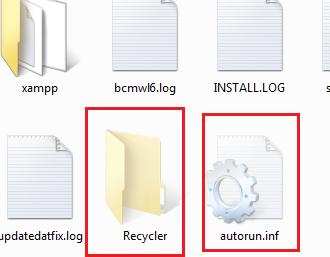
ISE32.exe usually hides on C:\RECYCLER\. It also create a folder name 'RECYCLER' and 'autorun.inf'
on your thumb drive or external drive.

ISE32.exe can also use the following names:
  • SUSPEITOS/WINDOSS.EXE
  • EXE32.EXE
  • IRZ[n].EXE
  • WINDOSS.EXE
  • 40378584.DAT
  • 92239921.DAT
  • 23419202.DAT
  • KK2[n].EXE
  • FOLDER.EXE
  • 10220403.EXE
  • K85DFDRFSDGT[n].EXE
  • SS1[n].EXE
  • B143GT[n].EXE
  • BOT[n].EXE
  • 64970665.EXE
  • SWDF.EXE
  • SYSTI.EXE
  • SYESTE.EXE
  • SYSTR.EXE
  • SYSTQ.EXE
  • SYSTZ.EXE
  • JHKJKJ.EXE
  • SYRSF.EXE
  • SYSF.EXE
  • SYWQT.EXE
  • DYDE.EXE
  • AVVAQ.EXE
  • IS2[n].EXE
  • 95741567.EXE
  • JUF34.EXE
  • WINDLL.EXE
  • IRC[n].EXE
How to detect you have this virus?
  1. Insert a flash disk, thumb drive or etc.
  2. If it has a folder name 'RECYCLER' and 'autorun.inf'
  3. Try delete the folder name 'RECYCLER' and 'autorun.inf'
How to remove:
 1. Remove all your thumb drive, pen drive or etc from your computer.
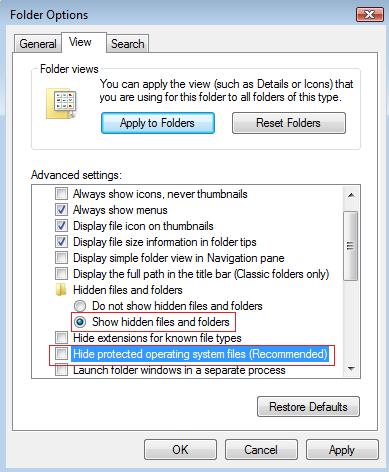
 2. Open 'Folder Option'. Choose show 'show hidden files and folders' and untick 'Hide
      protected operating system files (Recommended)
'.


 3. Delete this file:
C:\RECYCLER
C:\autoexec.bat
C:\c.exe


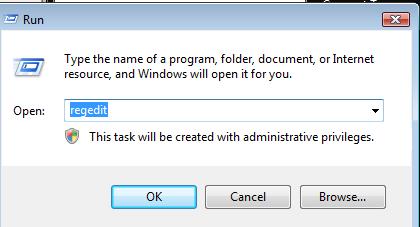
 4. Open 'Registry Editor' and don't close this yet because we need this later.


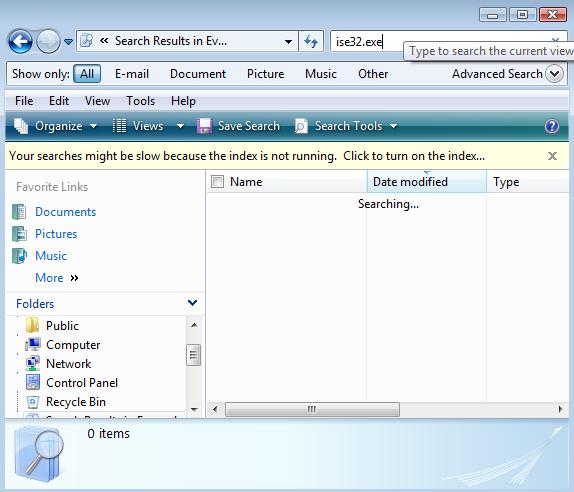
 5. Open 'Search' or press 'F3' on your keyboard to search files and folder.


 6. Search this keyword 'ise32.exe'.
 7. Delete the files that come from 'Prefetch'. Usually that have extension '.pf'. Warning!
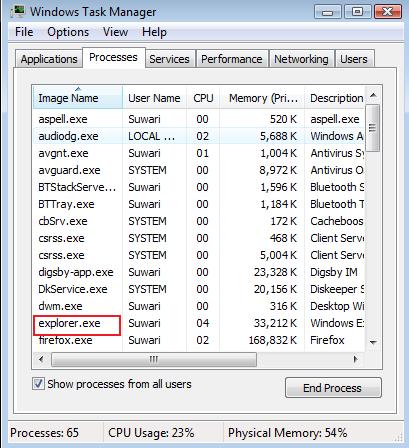
 8. Open 'Task Manager', find 'Explorer.exe' under the image name. Right click the image 
     name and choose 'End Process'. Don't close this yet.


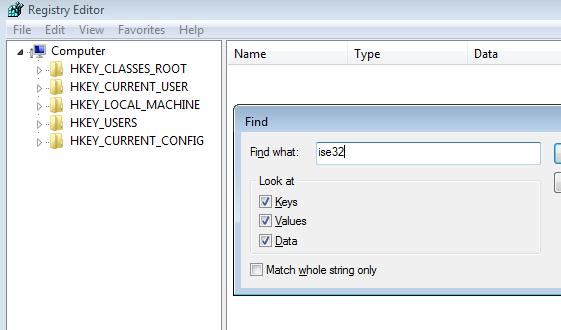
 9. Back to 'Registry Editor', press 'Ctrl + F' and search for 'ise32.exe'(without the '').


10. Delete all registry that have same name as 'ise32.exe' (without the'').Warning!
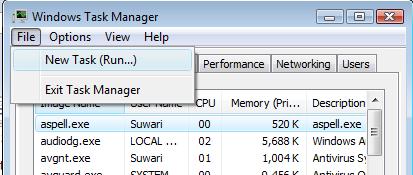
11. After that, go back to 'Task Manager'. Hover your mouse to 'File' and navigate to 'New
      Task (Run...)
'. Click 'OK'.


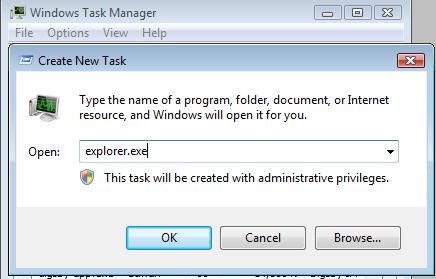
12. A 'Create New Task' windows will pop up. Type 'explorer.exe' and click 'OK'.


Warning!
DELETE file that have the 'ise32.exe' keyword and have '.pf' extension.
DONT delete registry like 'unwise32.exe'.
Delete the wrong file and registry may cause your computer unstable.

Technorati Tags: , , , ,


When installing Kaspersky Internet Security (KIS) and Kaspersky Anti-Virus(KAV), do you see this error:
“Attention! Some incompatible software is installed on your computer. These applications cannot be used together with Kaspersky Internet Security 2009. In order to proceed with the installation, remove these applications.”
This Incompatible Software window will show during the setup process wizard. It will stop and prevent the installtion of Kaspersky product. AVG 8 is the most common listed application.

Symptoms:
You have uninstall AVG 8 program but Kaspersky wizard setup still detect AVG.

You have try using Registry Mechanic, Registry Booster, Your Uninstaller, CCleaner and more but still no luck to remove the AVG 8. Still can not install Kaspersky.

How to fix:

Download this application and run this in your computer:

AVG Remover(32bit)
AVG Remover(64bit)

Technorati Tags: , , , , ,

C:\resycled\ntldr.com

Posted In: , . By suwari

C:\resycled\ntldr.com is a word that creates autorun.inf files on all drives when the removable drive is inserted into a computer.

Symptoms:
Cannot open all you drive using double click

How to remove ntldr.com?

First, enter the Windows using safe mode.

Kill process in the task manager:
ntldr.com

Delete Files and Folders:
C:\resycled\ntldr.com
C:\autorun.inf
%Programs%\aquaplay\Uninstall.lnk
%ProgramFiles%\aquaplay\Uninstall.exe
%Windir%\Temp\tmp6.tmp

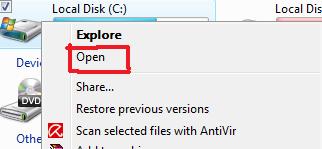
Note: Open your drive using your mouse. Right click your drive and choose open. Then find the files.


Remove Registry Values(Click here for how to open Registry Editor):
ntldr.com,
HKEY_CURRENT_USER\SOFTWARE\Trymedia Systems,
HKEY_CLASSES_ROOT\videoplay
HKEY_LOCAL_MACHINE\SOFTWARE\Classes\aquaplay
HKEY_CURRENT_USER\Software\aquaplay
Note: Press 'Ctrl+F' and search all the files.

Or just download this tools, click here. To use this tools, please enter the Windows using safe mode also.

Warning: If you delete the wrong files, it will make your computer unstable and can not be open. Your Windows also can be open and showing error such as 'Ntldr is missing'.

Technorati Tags: , , , ,

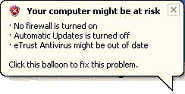
Your virus protection status is unknown

Your antivirus is out of date and need to update

Antivirus software might bot be installed

Your computer may be at risk because firewall is not turned on


Have you seen those warning pop-up in your computer desktop? Isn't it annoying? Even though you have installed antivirus, turned on the firewall, or using other firewall like Comodo Firewall or Sygate Personal Firewall, the warning still pop up. How to disable

Step-by-Step guide:

For Windows XP:

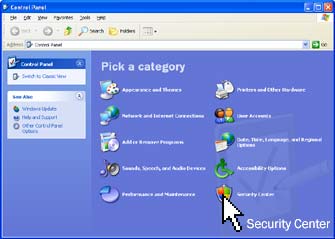
1. Open 'Control Panel' and double click 'Security Center' icon. Or Just right click the icon, choose 'Open Security Center'.


2. A 'Windows Security Center' windows will pop up.


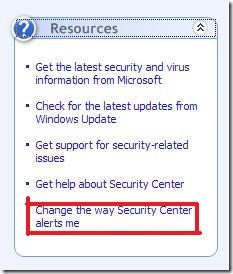
3. On the left tab you will see 'Resources', click 'Change the way Security Center alert me'.


4. Under 'Alert Settings' windows, uncheck all the check box if you don't want any alert.


Technorati Tags: , , , , , ,